The app has no server.
nusku is a mail client that runs on your Mac. It keeps its copy of your mail there, encrypted, and talks to Gmail and to the AI provider you chose directly. With your own key, nothing about your mail is sent to us, and we never store it. The optional nusku.app account, for prepaid AI credits and a Gmail connection through our Google client, is covered in the privacy policy.
Read the long versionThree places, and one the app does not need.
Your mail goes to one of these. A few other requests happen only when you trigger them: images you choose to load, an unsubscribe you click, a timestamp when you notarize, and tools you connect yourself. The update check, once a day, asks updates.nusku.app, our release hosting, whether a new version exists and carries no mail.
- Your MacMail, contacts, settings, everything nusku learns. Encrypted database; keys and tokens in the macOS Keychain.
- GoogleWhere your mail already lives. nusku talks to Gmail, Contacts and Calendar directly from your Mac.
- Your AI providerAnthropic, OpenAI or OpenRouter with your own key, and only for the AI functions you use.
- A nusku serverThe app needs none. Your mail is never stored by us, and with your own key nothing about it is sent to us.
Sealed like a clay envelope.
Mesopotamian letters traveled in clay envelopes that only the recipient broke open. These are the parts of nusku that keep yours closed.
- 01
No nusku server needed
Mail, tokens and AI calls stay between your Mac, Google and the provider you chose, plus any tool you connect yourself.
- No nusku server needed. Mail and tokens stay on your Mac; with your own key, AI calls go straight to the provider you chose.
- Privacy-safe diagnostics. The support bundle has counts, codes and timings only: no mail, no addresses.
- 02
Encrypted on your Mac
Your local copy of the mail is encrypted, and the keys are kept by macOS.
- Encrypted at rest. The local database is encrypted; keys live in the macOS Keychain.
- 03
Your own key
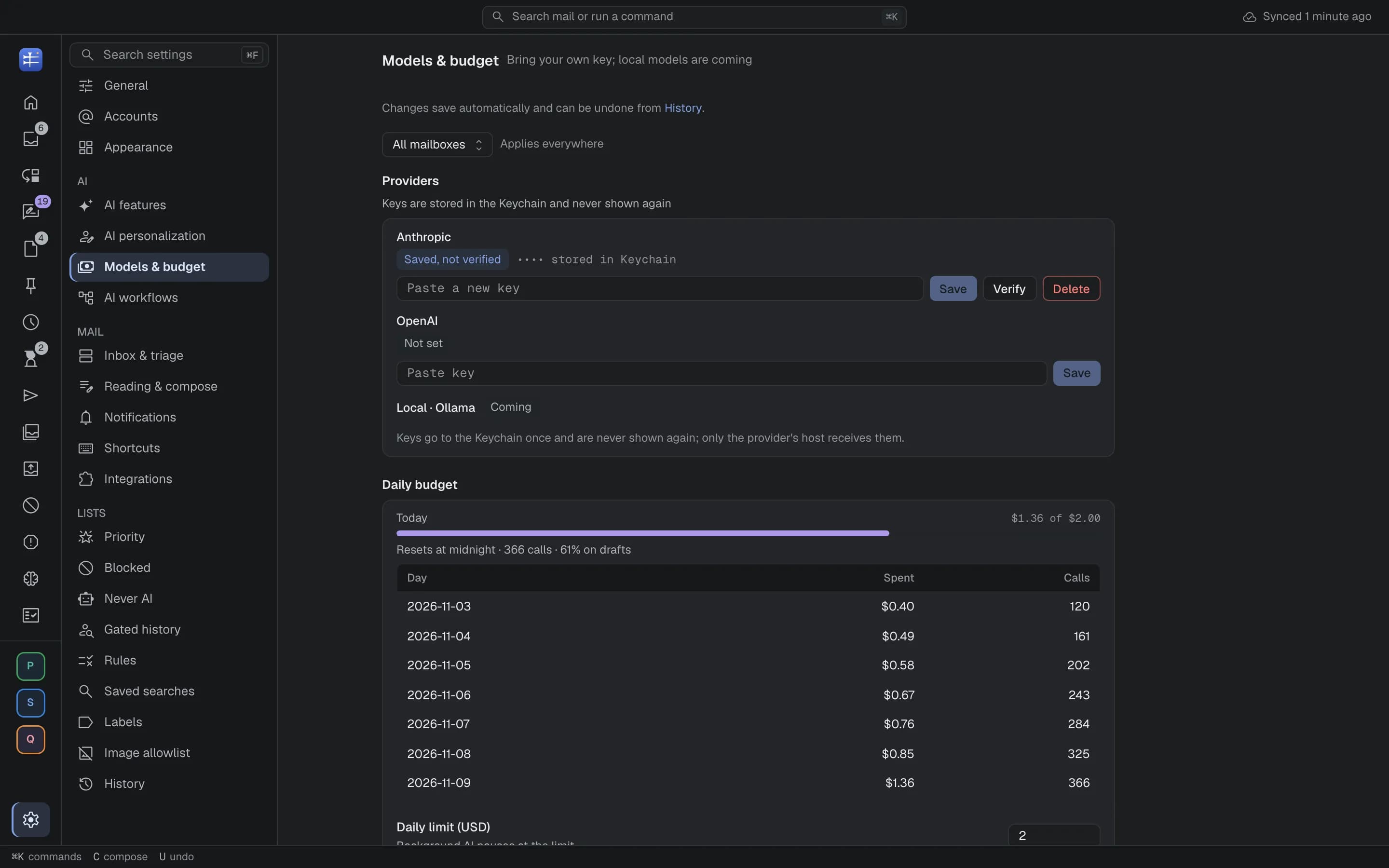
You bring an Anthropic or OpenAI key, and you see what every call costs.
- Bring your own key. Anthropic (primary), OpenAI or OpenRouter (the same Claude and GPT models, sent only to providers that keep no prompts); the key goes only to the provider.
- AI starts off or waits for your OK. Every switch under AI features is off until you turn it on, and so are meetings found in mail in the Calendar. Auto-Track starts by only asking in Review, and quick add with AI, which is on, runs only when you type an event into quick add and saves nothing until you check it. Nothing reaches a model before you add an AI key, and one switch runs nusku with no AI at all, globally or per mailbox.
- 04
Never AI
Some senders and mailboxes should never be read by a model. You decide which.
- Never AI. Exclude senders, or whole mailboxes, from any AI processing.
- 05
Context groups
Work and personal mail do not inform each other.
- Context groups. Mailboxes in different groups never share AI context or knowledge.
- 06
AI audit
Everything the AI did, with what it cost, and a way back.
- AI audit. Every AI call with its model, tokens and cost; prompts and responses can be kept on your Mac for 1–90 days (14 by default).
- Revert any AI action. From the audit or the activity log.
The AI never acts outside on its own.
Every switch under AI features starts off, and so do meetings found in mail in the Calendar; Auto-Track of sent mail only suggests, and the Calendar’s quick add with AI, which is on, runs only when you type an event into it. Once AI runs, these rules still hold, whatever you set.
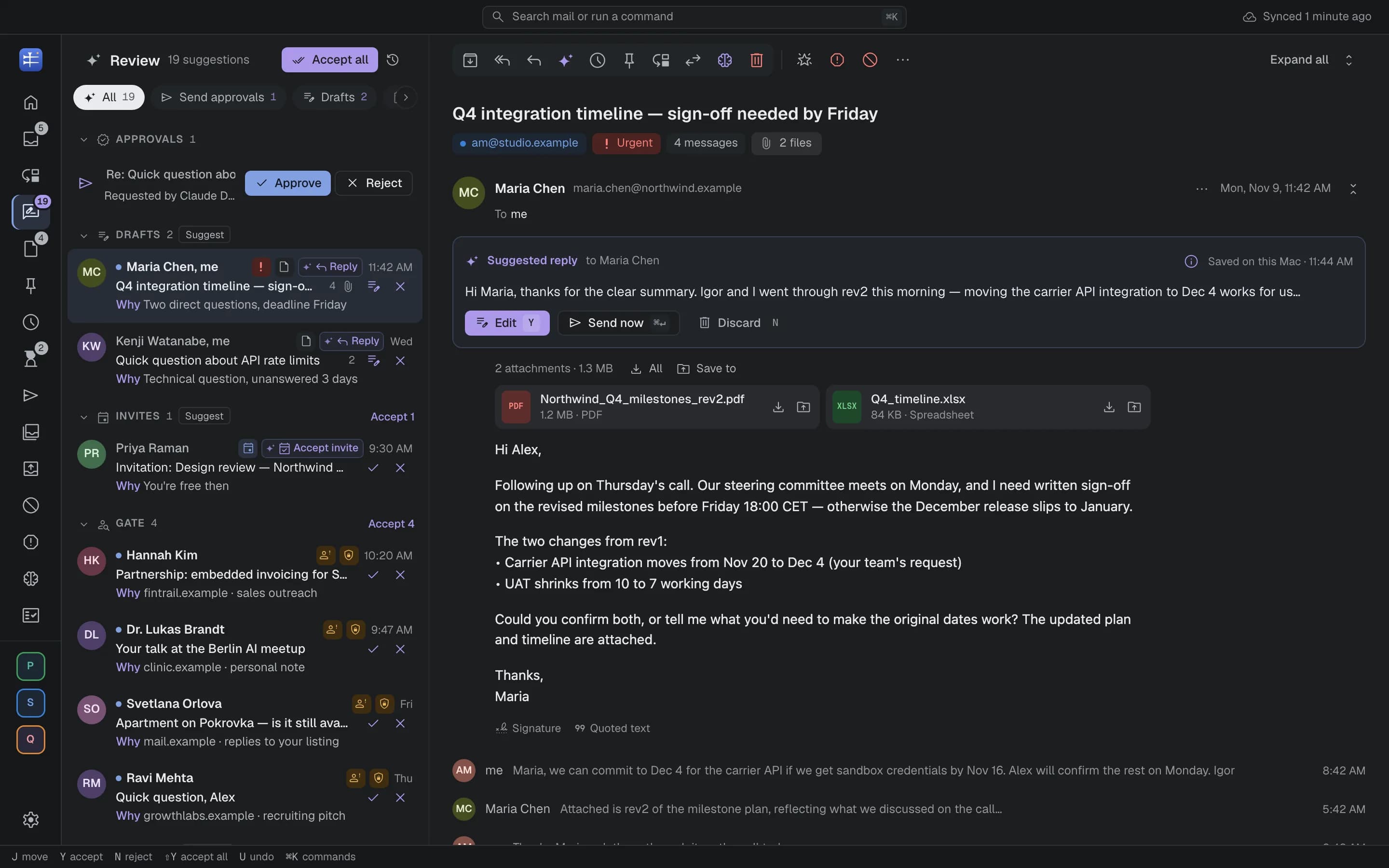
- Nothing outbound without youSend, forward, unsubscribe, RSVP and external requests always ask; the AI can suggest them but never perform them.
- Approval is bound to the exact contentAn approval covers that exact message or request; if it changes, it needs a new approval.
- Mail is data, not instructionsMail content goes to the model as untrusted data; your own notes and comments are the only instructions. Prompt-injection cases are part of the eval suites.
- One-time codes never reach the AISign-in codes and magic links are filtered out before any AI call.
- AI off, entirely or per mailbox"Use AI" off means no classification, drafts, summaries or other AI functions.
- Every AI function starts off or waits for your OKSorting, to-dos, drafts, Proof, translation, style learning and the other AI features each have their own switch and are off until you turn them on. Auto-Track starts in Suggest: once you add a key it asks in Review, and it never tracks on its own unless you choose Apply. In the Calendar, meetings found in mail start off (at Suggest they are only proposed), and quick add with AI, which is on, runs only when you type an event into quick add and saves nothing until you check it. On a new install, onboarding's Functions step shows nusku's recommendation for each function; you choose what to switch on.
- Hidden text removedInvisible text (for example, instructions aimed at AI) is stripped and ignored.
- Web research with your approvalThe AI proposes search queries; only the queries you approve leave your Mac.
Privacy in the everyday details.
Some of it is about AI. Most of it is about the ordinary ways mail leaks information.
- Tracking pixels always removedSenders do not learn when you opened their mail.
- Mail runs in a sandboxScripts in email never execute.
- Lookalike domains flaggedDomains using look-alike characters get a warning, and you can block lookalike senders.
- No false alarmsYour own messages are not flagged as failing authentication, and tracking redirects do not trigger "mismatched links".
- Trash and Spam stay out of AIMail in Trash or Spam never goes into AI context.
- Images ask firstLoading remote images is your choice, with a note that it can tell the sender you opened the mail.
- Diagnostics without contentLogs keep fixed strings, ids and counts only.
The legal side, including the Google API Services User Data Policy disclosure, is in the privacy policy.
Mail that stays yours.
Download for macOSv0.7.8Free, for macOS on Apple silicon.